Accessibility
Digital Accessibility Standards
Walters State Community College is committed to providing equal access to its programs, services, and digital content. This commitment is supported by Section 504 of the Rehabilitation Act, which prohibits disability discrimination and requires equal access for qualified individuals with disabilities.
Walters State also works to ensure that its web and digital content meets the Web Content Accessibility Guidelines (WCAG) 2.1 Levels A and AA, the accessibility standard established for covered web and mobile content under the U.S. Department of Justice’s Title II regulations.
These standards help guide the college’s ongoing efforts to identify accessibility barriers, improve digital content, and provide an accessible experience.
The "POUR" Model
WCAG is built around four accessibility principles:
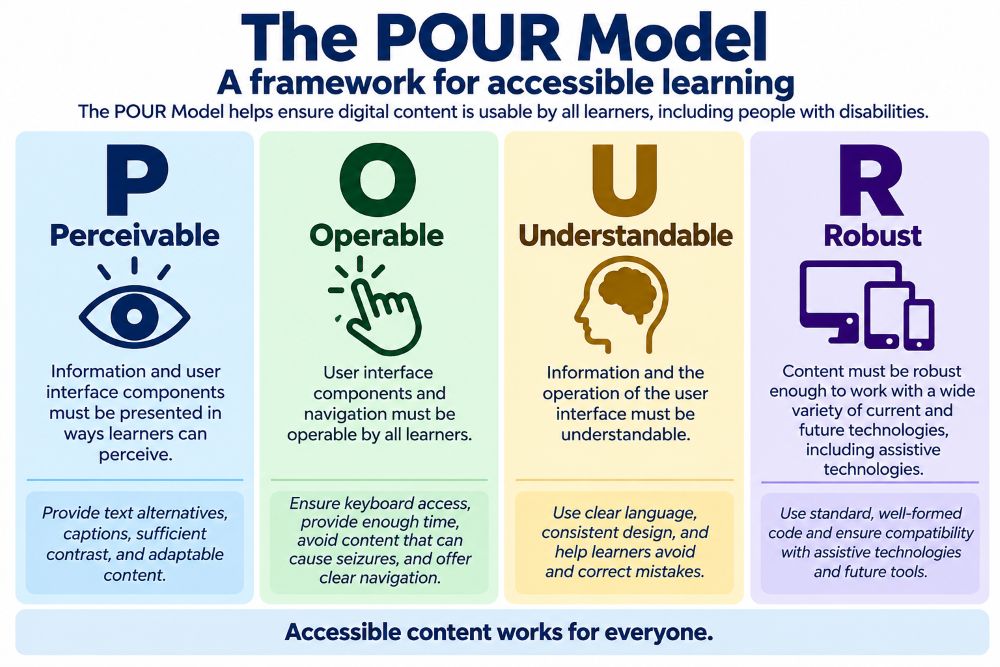
- Perceivable: Information can be accessed in different ways, such as alternative text for images and captions for videos.
- Operable: Content can be navigated and used with a keyboard and assistive technology.
- Understandable: Information and navigation are clear, consistent, and easy to follow.
- Robust: Content works reliably across browsers, devices, and assistive technologies.
Together, these principles help make digital content accessible and usable for everyone.
Yuja Panorama Scoring
To support WCAG 2.1 AA accessibility compliance, Walters State has enabled YuJa Panorama within D2L courses. Panorama's accessibility settings are configured to align with TBR recommended institutional standards.
In accordance with TBR expectations, faculty and course designers should strive to maintain a Panorama accessibility score of 90% or higher for course content. Regularly reviewing accessibility reports and addressing identified issues helps ensure course materials remain accessible to all learners.
Accessibility Mentors
The “Accessibility Mentor” initiative was established to provide faculty and staff with immediate accessibility support, resources, and training. The table below lists the representatives and the respective areas they provide assistance.
| Area | Accessibility Mentor |
|---|---|
| Humanities | Laura Osteen |
| Mathematics | Dr. Julianna Gregory |
| Natural Sciences | Dr. Katherine Stone |
| Public Safety | Nathan Antrican |
| Business and Technology | Jeri Haun |
| Behavioral Social Sciences | Dr. Kymberli Barker |
| Health Programs | Gail Winkler |
Internal Textbook Documentation Database
The Walters State Textbook Accessibility Documentation Database provides faculty with a centralized resource for submitting and reviewing accessibility documentation for textbooks and other required digital course materials. The database helps departments maintain documentation such as VPATs/ACRs, accessibility remediation information, and Alternate Access Plans for publisher platforms, digital textbooks, OER, and other potential digital resources used in courses.
This resource supports faculty in selecting and using accessible course materials while helping Walters State maintain documentation of its ongoing digital accessibility efforts.
Useful Digital Accessibility Links
Contact IDEAS
Hours
Mon - Thu 7:00am - 4:30 pm
Friday 8:00 - 4:30pm
Phone
423.585.6996
Address
Dr. David White Instructional Design Suite
Morristown Campus
Dr. Jack E. Campbell College Center
Suite 245 and 108A